





If you own a Ford vehicle equipped with the keyless keypad on the driver’s door, you already know how convenient it is to unlock your car without digging for a key. But convenience turns into frustration the moment you forget your five-digit code, buy a used Ford without knowing its code, or inherit a vehicle where the previous owner never shared it.
The good news is that you don’t need to panic or immediately call a locksmith. There are several practical, safe, and manufacturer-supported ways to change your Ford door code without the original code, and this guide walks you through every one of them in plain, easy-to-follow language.
Whether you drive an F-150, an Explorer, an Escape, an Edge, or any other Ford model with the SecuriCode keypad system, the underlying logic is largely the same.
This article breaks down how the system works, what you need before you begin, three proven methods to reset the code, model-specific quirks, common mistakes people make along the way, and answers to the questions Ford owners ask most often. By the end, you should feel confident tackling this yourself, or at least know exactly what to expect if you decide to visit a dealership instead.
Understanding the Ford Keyless Keypad System
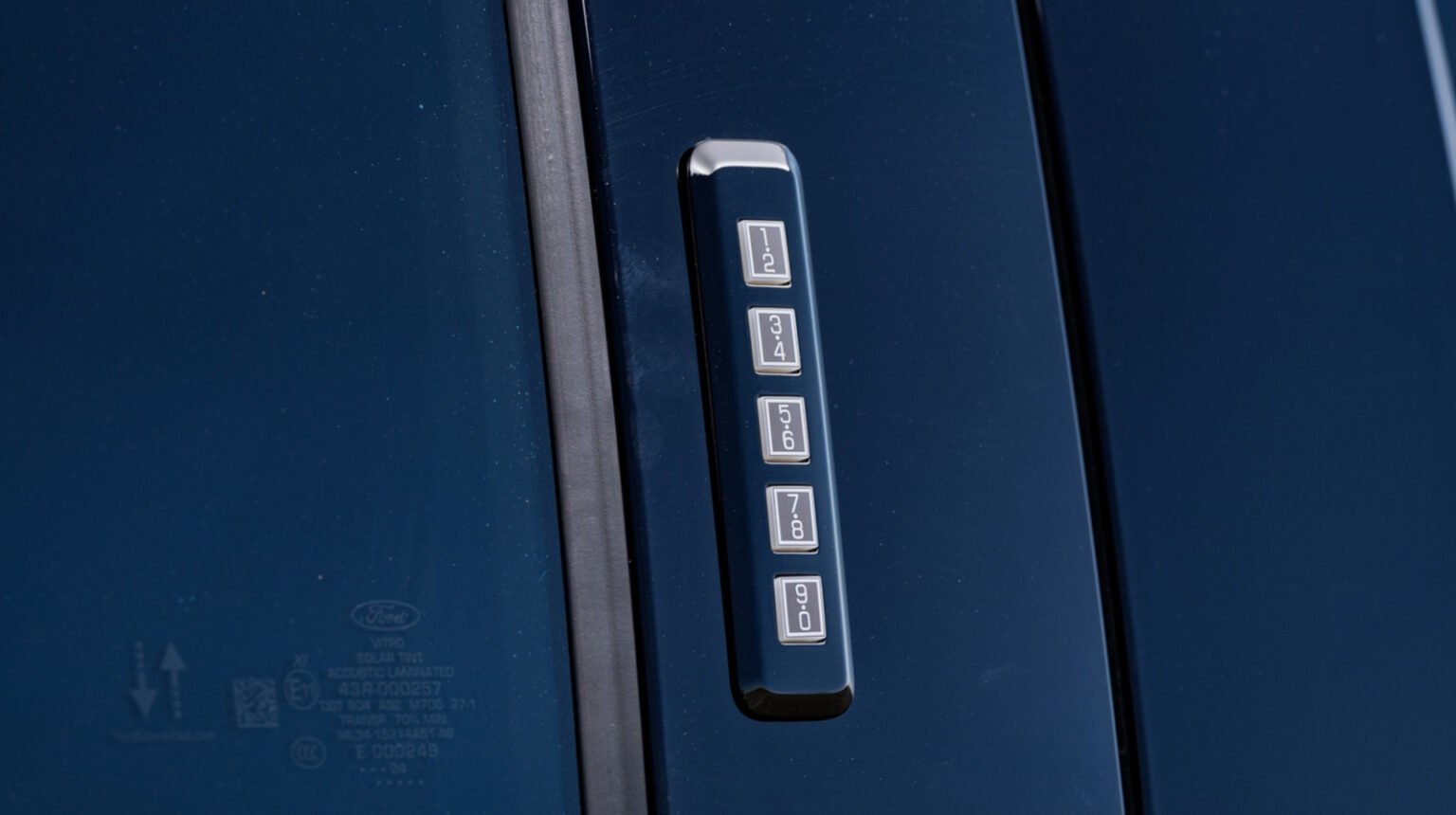
Ford has offered its keypad entry system, commonly branded as SecuriCode, on many of its vehicles for decades. The pad itself sits on the driver’s side door, just above the handle, and features a row of buttons numbered one through nine, sometimes represented as combinations rather than single digits (for example, one button might represent both “1” and “2”). When you press the correct sequence, the doors unlock without needing a physical key or a fob with working batteries.
The code is stored in the vehicle’s body control module, which is essentially the small onboard computer responsible for managing several convenience features in the car. Because the code lives inside this module rather than on a sticker or a card you carry around, losing track of it can feel like losing access to the car altogether. In reality, Ford designed the system so that owners could reprogram it themselves as long as they still have a way to get inside the vehicle and turn the ignition on. That single requirement is the foundation of nearly every method described below.
It also helps to understand why this feature matters beyond convenience. Many Ford owners rely on the keypad as a backup entry method when a key fob battery dies unexpectedly, or when they want to leave a spare way for a family member to get into the car without carrying a separate key. Because of this, learning how to reset or change the code is a skill worth having even if you’re not currently locked out.
Before You Start: What You Need
Before attempting any of the methods discussed in this article, it helps to gather a few things so you’re not stopping halfway through the process. Here is a simple table summarizing what you’ll want on hand depending on which method applies to your situation.
| Requirement | Why It Matters | Needed For |
|---|---|---|
| A working key or key fob | Allows you to turn the ignition to the “on” position, which is required to enter programming mode | Ignition reset method |
| Owner’s manual or model-specific documentation | Button combinations vary slightly between models and years | All methods |
| Vehicle Identification Number (VIN) | Dealers and locksmiths require this to verify ownership before generating a new code | Dealer/locksmith method |
| Proof of ownership (registration or title) | Prevents unauthorized individuals from resetting access codes | Dealer/locksmith method |
| A few uninterrupted minutes | The programming sequence times out if you pause too long between steps | All methods |
Having these ready before you begin will save you from repeating steps or losing your place partway through the process, especially since some of the button sequences must be completed within a strict five-second window.
Method 1: Try the Factory Default Codes First
Before assuming the worst, it’s worth checking whether your Ford is still set to its factory default code. Many Ford vehicles leave the factory with a preset combination that owners are expected to change but frequently don’t. The two most common defaults are 1-2-3-4 and 1-3-5-7, though this can vary depending on the model year and trim level.
To test this, simply approach the driver’s door and enter one of these sequences on the keypad. If the doors unlock, you’ve solved the problem without needing to touch the vehicle’s programming menu at all. However, keep in mind that just because the default code unlocks the doors doesn’t mean it’s a good idea to leave it that way. Once you’re inside the car, it’s worth immediately moving on to Method 2 so you can set a new, more private code rather than relying on a widely known factory default that anyone with a bit of research could guess.
This method costs nothing, takes only a few seconds, and is always worth attempting first before assuming you need professional help.
Method 2: Reprogram the Code Using a Working Key or Fob
This is the most common and most reliable method for changing a Ford door code without the original code, provided you still have access to a working key or key fob. The entire process typically takes less than a minute once you know the sequence, and it doesn’t require any special tools, apps, or dealership visits.
Here is the general process, though you should always cross-check the specific button combination against your owner’s manual since it can differ slightly by model:
- Get inside the vehicle using your working key or fob and sit in the driver’s seat.
- Turn the ignition switch to the “ON” position without starting the engine. On push-button start models, this usually means pressing the start button once without pressing the brake pedal.
- Within five seconds of turning the ignition on, locate the two buttons on the keypad that are used for entry into programming mode. On most models this is the 1-2 button and the 3-4 button pressed together, though some vehicles use a different pairing.
- Press and hold both buttons simultaneously for approximately five seconds, until you hear a single chime or a series of tones confirming that programming mode has been activated.
- Once you’re in programming mode, enter your desired new five-digit code using the numbered buttons on the keypad.
- Immediately re-enter the exact same five-digit code a second time to confirm it. This step exists to prevent accidental typos from locking you out of your own new code.
- Turn the ignition back off. The system will save your new code automatically, and you can test it right away by exiting the vehicle and entering the new sequence on the exterior keypad.
If you don’t hear the confirmation chime at any point, the safest approach is to turn the ignition off completely and restart the process from step one, since the programming window is time-sensitive and easy to miss if there’s any hesitation.
Method 3: What to Do If You Don’t Have a Working Key
Sometimes the situation is more complicated than a forgotten code. If you don’t have any working key or fob at all, none of the self-service methods above will work, since they all require the ignition to be turned on from inside the car. In this case, your remaining options are a Ford dealership or a professional automotive locksmith.
Both options rely on accessing the vehicle’s programming through a factory diagnostic tool rather than the keypad’s manual entry sequence. Because this method can technically grant someone full access to your vehicle’s security systems, dealerships and locksmiths will require solid proof that you’re the rightful owner. Typically, this means bringing your vehicle’s title or registration along with a government-issued photo ID and, in some cases, the VIN plate visible through the windshield for cross-referencing.
The cost and time required for this option vary depending on your location and whether you go through a dealership or an independent locksmith, but it’s generally a straightforward visit rather than an extended repair job. Locksmiths who specialize in automotive work can sometimes complete the reset faster and at a lower cost than a dealership service department, though dealerships have the advantage of being directly connected to Ford’s official systems and documentation.
Model-Specific Differences Worth Knowing
While the overall process for resetting a Ford door code remains consistent across the lineup, small details can differ from one model to another, and even between different years of the same model. The table below outlines a general overview, though you should always confirm specifics against your particular owner’s manual since Ford has made adjustments over different production years.
| Model | Typical Button Combination | Notes |
|---|---|---|
| F-150 | 1-2 and 3-4 pressed together | Some newer trims use the SYNC touchscreen for additional confirmation |
| Explorer | 1-2 and 3-4 pressed together | Push-button start models require pressing start without the brake |
| Escape | Varies by year; check manual | Compact SUVs sometimes use a slightly shorter hold time |
| Edge | 1-2 and 3-4 pressed together | Similar process to Explorer and F-150 |
| Expedition | 1-2 and 3-4 pressed together | Full-size SUVs generally mirror F-150 programming steps |
The reason these differences exist comes down to how Ford has updated its body control modules over the years as vehicles gained more advanced electronics, touchscreens, and remote start capabilities. A vehicle from the early 2010s might behave slightly differently than one built in the last few years, so treating your owner’s manual as the final authority is always the smartest approach.
Common Mistakes and Troubleshooting Tips
Even when following the steps correctly, a few common issues tend to trip people up. Understanding these ahead of time can save you from unnecessary frustration.
One frequent mistake is waiting too long between turning the ignition on and pressing the two-button combination. Since the programming window only stays open for about five seconds, any hesitation means you’ll need to start over completely. Another common issue involves a weak or dying battery in the body control module’s backup power source, which can cause the chime confirmation to be faint or missing entirely, making it seem like the process failed when it may have actually worked.
Some owners also mistakenly try to reset the code using the key fob’s remote buttons rather than the physical keypad on the door, which will not work since the programming sequence is tied specifically to the door-mounted keypad hardware. Additionally, low temperatures in extreme winter conditions have been known to make keypad buttons less responsive, so if you’re attempting this outdoors in cold weather and the buttons don’t seem to register, try pressing firmly and holding slightly longer than usual.
If you’ve attempted the reprogramming steps multiple times without success and you’re confident you’re using the correct button combination for your model, it may indicate a deeper electrical issue with the body control module itself, in which case a dealership visit becomes the more practical next step rather than continuing to troubleshoot at home.
Why Proof of Ownership Matters
It might seem inconvenient that dealerships and locksmiths require documentation before resetting a code without the original, but this requirement exists for good reason. The keypad system is a security feature, and bypassing it without any verification would defeat its entire purpose. Vehicle theft prevention relies partly on the fact that changing access credentials isn’t something a stranger can walk in and request without evidence of ownership.
For this reason, it’s worth keeping your registration, title, or at least a photo of these documents easily accessible, especially if you’ve recently purchased a used Ford and haven’t yet had the chance to reset the keypad code to something private. Taking care of this early, right after a used car purchase, is one of the simplest ways to avoid complications down the road.
Frequently Asked Questions
Can I change a Ford door code without the original code if I don’t have any key at all? Not through the keypad itself, since the ignition-based reprogramming method requires a working key or fob to access programming mode. In this scenario, a dealership or automotive locksmith is your best path forward.
Will trying the factory default code cause any damage or lock me out further? No. Entering an incorrect combination on the keypad simply does nothing; it won’t lock you out permanently or trigger any alarm. You can try as many combinations as needed without risk.
Does resetting the code affect my key fob or remote start functionality? No, the door keypad code is a separate system from your key fob’s programming, so changing one does not impact the other.
How often should I change my Ford door code? There’s no strict requirement, but it’s good practice to change it whenever you buy a used vehicle, share the code with someone who no longer needs access, or simply suspect that someone outside your household may know it.
Is the process the same for older and newer Ford models? The general concept remains consistent, but exact button combinations and hold times can vary, so always check your specific owner’s manual for confirmation.
Final Summary
Changing a Ford door code without the original code is far less complicated than most owners initially assume. Start by testing the common factory default combinations, since this alone resolves the issue for many people in just a few seconds. If that doesn’t work, and you still have access to a working key or fob, the ignition-based reprogramming method will let you set a brand-new code in under a minute. Only in situations where no working key exists at all does the process require outside help from a dealership or a qualified automotive locksmith, and even then, the process is quick as long as you bring proper proof of ownership.
Keeping this guide handy, or bookmarking it for future reference, means you’ll never be caught off guard again if your Ford’s keypad code slips your memory.
Related Articles
Are Ford Broncos Safe? Complete Safety Ratings & Features Guide 2026
How Much Does a Ford Raptor Cost in 2026? Full Price Breakdown
What Does the Wrench Light Mean on a Ford? Causes, Fixes & Costs Explained