





Introduction
If your Ford key fob has suddenly stopped responding the way it used to, or if you have to stand right next to your car just to lock or unlock it, there is a very good chance that the battery inside is running low. This is one of the most common issues Ford owners face, and the good news is that it is also one of the easiest problems to fix on your own. You do not need any special tools, mechanical knowledge, or a trip to the dealership to solve it.
This guide walks you through everything you need to know about how to change battery in Ford key fob devices, from recognizing the early warning signs to opening the fob safely, installing the new battery correctly, and getting your fob working like new again. Whether you drive a Ford Focus, Fiesta, Escape, Explorer, F-150, or any other Ford model, the general process is very similar, and this article breaks it down in a way that is simple to follow even if you have never opened a key fob before.
By the end of this article, you will understand why key fob batteries wear out, what type of battery your Ford fob likely uses, how to open and reassemble the fob without damaging it, and what to do if the fob still does not work after the battery has been replaced.
Signs Your Ford Key Fob Battery Needs Replacing
Before jumping into the replacement process, it helps to confirm that the battery is actually the problem. Key fobs rarely fail completely and suddenly. Instead, they usually give off a few warning signs over time that indicate the battery is losing its charge.
One of the earliest signs is a reduced range. Where you may have once been able to unlock your car from across a parking lot, you now find that you need to be standing just a few feet away for the signal to register. Another common symptom is a delayed response, where you press the lock or unlock button and there is a noticeable pause before the car reacts, or you have to press the button multiple times before anything happens.
Many newer Ford models also display a dashboard warning message such as “Key Fob Battery Low” or a similar alert on the instrument cluster. This is the most direct indicator and should not be ignored, since it means the vehicle itself has detected weak signal strength from the fob. In more advanced cases, the fob may stop working altogether, showing no response at all when buttons are pressed, or the interior lights and remote start feature may fail to activate.
If you are noticing one or more of these symptoms, it is a strong signal that it is time to learn how to change battery in Ford key fob housing and get a fresh one installed.
Types of Ford Key Fobs
Ford has used a variety of key fob designs over the years, and while the core replacement process is similar across all of them, there are a few differences worth understanding before you begin.
Standard remote key fobs are the most traditional type. These usually have a physical blade key that can be pulled out, along with buttons for locking, unlocking, and sometimes remote start or trunk release.
Smart key or proximity fobs, on the other hand, are designed to work simply by being carried in your pocket or bag. These allow keyless entry and push-button start, meaning you never have to physically insert a key into the ignition.
Some Ford fobs also come with an integrated blade key that folds out from the body of the fob, similar to a pocketknife design, while others have a separate physical key that must be removed before the fob case can be opened.
The table below summarizes the general differences between these fob types.
| Fob Type | Common Features | Battery Access |
|---|---|---|
| Standard Remote Fob | Physical key, basic lock/unlock buttons | Slide or pry open the back case |
| Smart/Proximity Fob | Keyless entry, push-button start | Emergency key removed first, then case opened |
| Fold-Out Key Fob | Integrated folding blade key | Case opens after key is folded out |
Knowing which type of fob you have will make the process of opening it much smoother, since the emergency key removal step differs slightly depending on the design.
What You’ll Need Before Starting
Before you begin the replacement process, it is worth gathering a few simple items so that the job goes smoothly without any interruptions. You do not need anything expensive or specialized, and most of these items are likely already in your home.
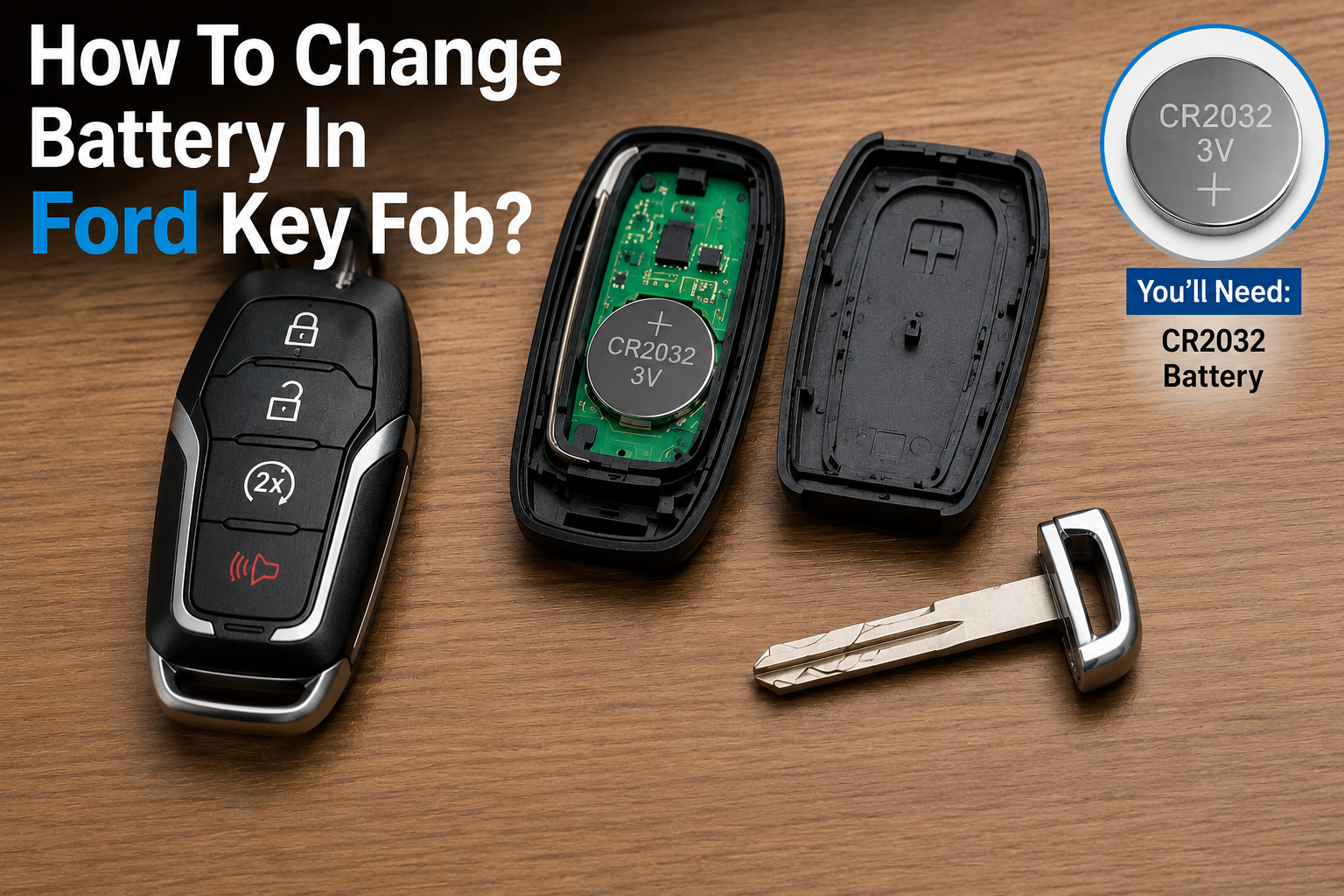
You will need a replacement battery, which is most commonly a CR2032 coin cell battery, though some Ford models use a CR2016 instead. A small flathead screwdriver or a sturdy coin will help you pry open the fob casing without damaging it.
A soft cloth or microfiber cloth is useful for placing the fob on while you work, which helps prevent scratches on both the fob and the surface you are working on. Finally, having your owner’s manual nearby, either physically or as a digital copy, can be helpful as a reference in case your specific model has a slightly different battery type or opening mechanism.
Taking a few minutes to prepare these items in advance will make the entire process faster and reduce the risk of fumbling with small parts once the fob is open.
How to Identify the Correct Battery Type for Your Ford Model
Using the wrong battery size can prevent the fob from working properly or may not fit securely inside the casing, so it is important to confirm the correct type before making a purchase.
The most reliable way to check is to look at your owner’s manual, which typically lists the exact battery specification for your key fob under the “Keys and Locks” or “Remote Control” section. If you do not have access to the manual, another simple method is to open the fob and check the old battery itself, since the battery type is usually printed directly on its surface.
While the exact battery can vary by trim level and production year, the table below gives a general idea of commonly used battery types across popular Ford models.
| Ford Model (General Range) | Common Battery Type |
|---|---|
| Focus, Fiesta | CR2032 |
| Escape, Edge | CR2032 |
| Explorer, Expedition | CR2032 |
| F-150, F-250 | CR2032 |
| Fusion, Mustang | CR2032 or CR2016 |
Since battery requirements can differ slightly even within the same model depending on the year and fob design, it is always best to confirm with the printed label on the old battery or your owner’s manual before buying a replacement.
Step-by-Step Guide: How to Open a Ford Key Fob
Opening the fob is often the part that makes people the most nervous, but it is a straightforward process once you understand the basic mechanism. Ford fobs are generally designed with a simple clip or seam that allows the case to be separated without tools beyond a small screwdriver or coin.
The first step is to remove the metal emergency key if your fob has one. This is usually done by pressing a small release button or sliding a latch on the back of the fob, which allows the key to slide out. Once the key is removed, you will often notice a small slot or opening where the key was previously housed. This slot is typically the access point for prying the case open.
Next, locate the seam that runs along the edge of the fob where the two halves of the case meet. Insert your flathead screwdriver or coin gently into this seam, and slowly twist or apply light pressure to separate the case. It is important to work slowly and avoid using excessive force, since Ford fob cases are usually held together by small plastic clips that can crack if pried too aggressively.
Once you feel the clips release, you can gently pull the two halves of the fob apart with your fingers. At this point, you should be able to see the internal circuit board along with the battery sitting inside its designated slot.
Step-by-Step Guide: Replacing the Battery
With the fob open, replacing the battery itself is quick and simple. Before removing the old battery, take a moment to note its orientation inside the fob, meaning whether the positive or negative side is facing upward. This detail matters because installing the new battery backward will prevent the fob from working, even if everything else is done correctly.
Once you have noted the orientation, gently remove the old battery from its slot, usually by pressing down on one edge to pop it out or sliding it out from underneath a small retaining clip. If you notice any dust, residue, or corrosion around the battery contacts, wipe them gently with a dry cloth before inserting the new battery.
Insert the new battery in the exact same orientation as the old one, making sure it sits flush and securely within the slot. After the new battery is in place, carefully align the two halves of the fob casing and press them back together until you hear or feel the clips snap into place. If your fob had a physical emergency key, slide it back into its housing at this stage.
Before fully closing the fob or reattaching it to your keychain, it is a good idea to test the buttons briefly to confirm the new battery is working properly.
How to Reprogram or Resync the Key Fob (If Needed)
In most cases, simply replacing the battery is enough to restore full function to your Ford key fob, since Ford fobs generally retain their programming even when the battery is removed. However, in some situations, particularly with certain smart key systems, the fob may need to be resynced with the vehicle after the battery change.
Many Ford models allow for a simple manual resync process using the ignition cycle. This typically involves inserting the physical key into the ignition and turning it on and off a specific number of times within a short window, which puts the vehicle into programming mode and allows it to recognize the fob again. The exact sequence can vary by model and year, so checking your owner’s manual for the precise steps is recommended.
If the manual resync process does not work, or if your vehicle uses a more advanced smart key system that requires specialized diagnostic equipment, a visit to a Ford dealership or a qualified locksmith may be necessary to complete the reprogramming.
Common Mistakes to Avoid
While changing a key fob battery is a simple task, there are a few common mistakes that can lead to unnecessary frustration. Being aware of these ahead of time can save you both time and money.
One frequent mistake is purchasing the wrong battery type or size, which may either not fit properly or fail to power the fob correctly. Another common issue is inserting the new battery with incorrect polarity, meaning the positive and negative sides are reversed from how they should be seated.
Some people also apply too much force when prying open the case, which can crack the plastic housing or damage the internal clips, making the fob harder to close securely afterward. Lastly, skipping the testing step before fully reassembling the fob can mean you close everything up only to discover the battery was faulty or improperly placed, requiring you to open it all over again.
Taking your time through each step and double-checking battery orientation and case alignment will help you avoid these common pitfalls.
Troubleshooting: Key Fob Still Not Working After Battery Change
If you have followed all the steps to change battery in Ford key fob housing and the remote still is not working, there are a few possible explanations worth considering before assuming something more serious is wrong.
- First, it is worth checking whether the new battery itself might be faulty or was not fully charged to begin with, which can sometimes happen with older stock batteries purchased from certain stores.
- Second, as mentioned earlier, some fobs require a resync process after a battery change, so if you skipped this step, it may be worth attempting it.
- Third, there could be underlying internal circuit damage within the fob itself, particularly if the fob has been dropped, exposed to water, or is simply very old.
If none of these troubleshooting steps resolve the issue, it may be time to visit a Ford dealership or an automotive locksmith, who can run diagnostics on the fob and determine whether it needs to be reprogrammed or replaced entirely.
Cost Comparison: DIY vs. Professional Replacement
One of the biggest advantages of learning how to change battery in Ford key fob housing yourself is the significant cost savings compared to having it done professionally. A replacement coin cell battery typically costs only a small amount and can often be purchased at local pharmacies, hardware stores, or electronics shops. The entire process, from opening the fob to testing the new battery, usually takes only a few minutes once you know what you are doing.
In contrast, having a dealership or service center replace the battery for you often involves a service fee that can be many times higher than the cost of the battery itself, simply because you are paying for labor and convenience. While this option may still appeal to those who prefer not to handle small electronics, doing it yourself is by far the more economical choice for such a simple task.
Tips to Extend Key Fob Battery Life
While key fob batteries will eventually need replacement no matter what, there are a few habits that can help extend the lifespan of your battery and reduce how often you need to repeat this process.
Avoiding extreme temperatures is one of the most effective ways to protect battery life, since leaving your fob in a very hot car or exposing it to freezing conditions for extended periods can drain the battery faster than normal.
Reducing unnecessary button presses, such as repeatedly clicking the lock or unlock button when it is not needed, can also help conserve battery power over time.
Additionally, storing your fob properly when not in use, such as keeping it away from moisture and avoiding placing it in pockets where it may be pressed against other objects, can help maintain its condition for longer.
Frequently Asked Questions
How often should I replace my Ford key fob battery? Most Ford key fob batteries last between one and three years, depending on usage frequency and battery quality, though this can vary based on the specific fob model and driving habits.
Can I use any CR2032 battery brand? Generally, yes, as long as the battery matches the correct size and voltage specified for your fob. However, choosing a reputable battery brand can help ensure better performance and longevity.
Does changing the battery erase programming? In most cases, no. Ford key fobs typically retain their programming even after the battery is removed and replaced, though certain smart key systems may occasionally require a resync.
What if my fob still doesn’t work after replacement? If the fob remains unresponsive after installing a new battery, double-check the battery orientation, attempt a manual resync if applicable, or consult a dealership for further diagnostics.
Conclusion
Learning how to change battery in Ford key fob housing is a simple, cost-effective skill that every Ford owner can benefit from knowing. By recognizing the early warning signs of a weak battery, gathering the right tools, and following a careful step-by-step process to open, replace, and reassemble the fob, you can save both time and money while keeping your key fob functioning reliably.
Regular maintenance and awareness of your fob’s performance can help you catch battery issues early before they become a bigger inconvenience. If you ever run into persistent problems even after replacing the battery, do not hesitate to reach out to a Ford dealership or trusted automotive professional for further assistance.
Related Articles
Are Ford Explorers Reliable? A Complete Buyer’s Guide
Is 1000A Amp Jumper Good For A 2007 Ford Escape?
How To Turn Off Mykey Ford Without Admin Key? Complete 2026 Guide
Are Ford Broncos Reliable? A Complete Year-by-Year Reliability Guide